

What is a digital project?
To set up a digital project, you first need to understand what we mean by a digital project. The answer is actually quite simple. As soon as the ‘end product’ of your project contains a digital element, it is already a digital project. This ranges from basic digital facilities, such as a website or CRM system, to innovative applications like a digital exhibition or app.
In this longread, we cover all the steps involved in a digital project within basic services.
What is the difference between basic services and innovation?
Basic service projects
Recurring, structural services that are part of the core of your organizationHide explanationShow explanation
Basic service projects
By basic services, we mean the recurring, structural services that are part of the core of your organization, such as implementing existing internal systems or renewing existing digital tools.
This means that a digital project could, for example, be a new software system, online document management, a collaboration environment, a new (corporate) website, or an administrative system (planning system, accounting system, etc.).
For a digital project as part of your basic services, you can clearly describe in advance the outcome you aim for and the impact the project will have on the organization.
When do we speak of an innovative digital project?
Innovation refers to products that do not yet existHide explanationShow explanation
When do we speak of an innovative digital project?
Something new, that did not previously exist, and that needs to be conceived, designed, and developed from scratch (so not just something that needs improvement). Examples include games, tangible technology for public engagement, an app or augmented reality, or working with new applications of AI.
An innovation project often starts with many assumptions and uncertainties due to the 'new' aspect. The process also differs from a project for basic services: with innovation projects, the exact desired outcome is often not yet fully known.
Setting up a digital project for your basic services
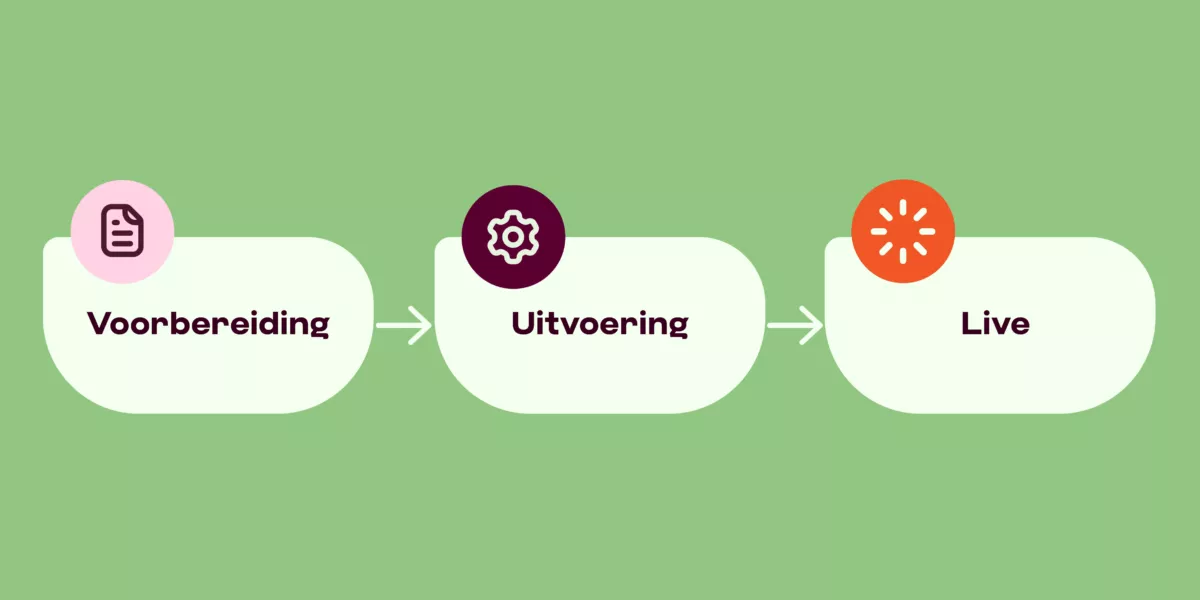
To effectively approach a digital project, you need to go through three standard phases: preparation, execution, and follow-up.
Preparation includes clearly articulating the why and setting up a project canvas. You can think of this as a compact visual representation of a project, where you quickly and clearly structure the key elements. This is useful for brainstorming, discussing, and planning your digital project. A project canvas can help you think about the questions you need to answer before starting your digital project.
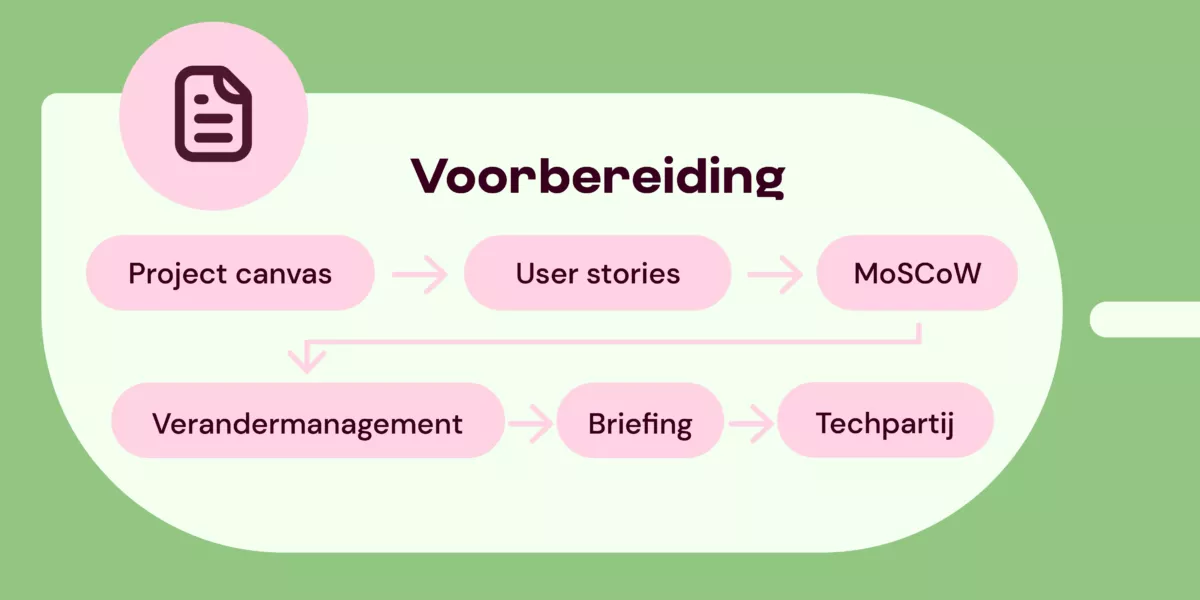
Go directly to phase execution or live.
The project canvas as a tool for a digital project
Such a project canvas is a tool and a precursor to the briefing you eventually communicate to a technical partner. A kind of preliminary research. In a project canvas, you answer questions like: why do you want this digital project, what problems are you solving with the digital project, and for whom is the digital project intended? With DEN's project canvas template and step-by-step plan, you can systematically map out these questions and their answers, providing a clear starting point for a digital project.
In the article 'Project canvas: a good start for your digital project (opens in new tab)' we delve deeper into the theory of the project canvas.

How can user stories help me further?
In a project canvas, you often work with user stories. A user story is literally: a user's story. It is a short description of a user's need in the form of a brief narrative. User stories help you visualize in advance what exactly you are solving for whom and why with your digital project. Use our template for user stories within a digital project.
In the article 'User stories explained: who are the users of a digital project? (opens in new tab)' we further explore the theory surrounding user stories.
How do I determine what is important in my digital project?
The MoSCoW method
While creating your project canvas and working with user stories, you'll need to prioritize: what is important and what is not? To prioritize effectively within a digital project, you need to list: which elements are nice to have but not essential? What is desirable but currently at the bottom of the priority list? And what do we (consciously) leave aside for now?
There is a simple method to distinguish all these things: the MoSCoW method. With this, you differentiate between Must have (mandatory), Should have (highly desirable), Could have (nice but not necessarily now), and Won’t have (not needed for now). Here's the difference between these four.
Must have
The Must have list includes the elements that are crucial to start the project. For example, hardware or privacy-preserving software.
Should have
The wish list contains items you want to deliver in the (medium) long term. These are not yet necessary for the first phase of the project (short term). For example, the use of a Large Language Model trained only with proprietary data.
Could have
A list of Could haves essentially says: this is nice to have, but maybe for later. For example, a new CRM system that can ‘talk’ to the CMS.
Won’t have
This one is clear: not needed (for now). By distinguishing these four, you have a clear view of priorities and know what must and what may be. This list also helps you in a concrete conversation later with your future technical partner.
How do you involve users in a digital project?
One way to make change easier and more successful is the Prosci method, a well-known change management method. We guide you step by step through the Prosci method for change management.
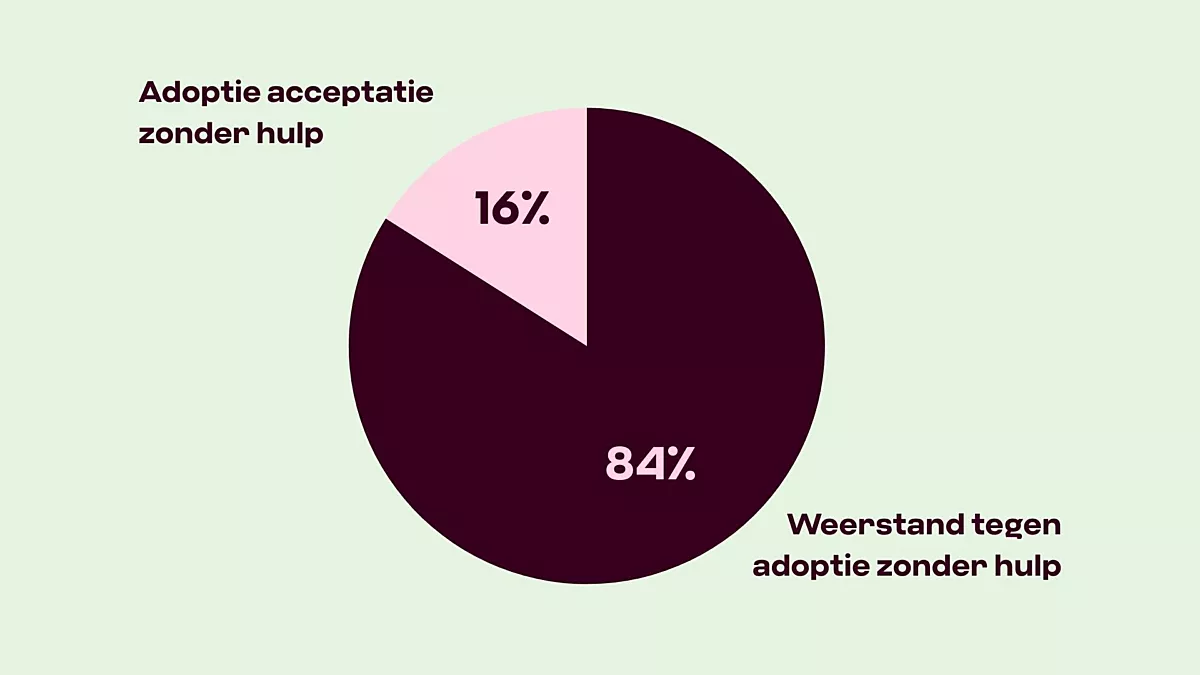
Implementing a new system requires significant effort. While you can create it, it also needs to be used effectively. How do you ensure that? And how do you reduce or prevent resistance to a digital project? Change management can help. Change management is where you actively involve everyone who will be affected by the digital trajectory in any way. We guide you step by step through the Prosci method for change management so that your digital project is well-received by all your users.
In the article Implementing digital projects: dealing with change (opens in new tab), we explain what change management entails and how you can practically apply the Prosci method and the ADKAR model.
How to write a good briefing?
For almost all digital projects, you need an external party. A project canvas is usually too concise for a conversation — it is more of a strategic summary. Therefore, it is important to create a clear briefing before you start looking for a tech partner. In it, you indicate what you expect, estimate the budget, mention a rough deadline, and specify who needs to be involved internally.
In this article 'How to write a good briefing for your digital project' we explain the requirements for a good briefing.
How do I choose the right technical partner for my digital project?
Which technical company would suit your digital project? Ask yourself the following questions during orientation: is this company familiar with your sector, and have they developed a similar product before? Does their way of working align with your organization? Does their project approach fit your needs? Would a large or small company be better suited to your organization?
You can, of course, work with a company you already know, but also consider meeting new candidates or organizing a pitch.
How to best choose a suitable technical partner for a digital project can be read in the article 'How to choose a tech partner for your digital project (opens in new tab)'.
You've chosen your tech partner, now what?
You have your company. Now what? Often, the first step is deciding whether to go for an existing solution (possibly with modifications) or a new product; usually, you will find that the working method is determined by the company you collaborate with.
They have experience building the product and can determine if it works well in the context you want to use it. Together with your tech partner, you ultimately decide on the final working methods, budget, schedule, and project team.
Phases of an existing solution
If you choose an existing solution on the market, you can often agree on a pilot with your technical supplier. This is like a trial period. You don't have to buy the solution immediately or purchase a long-term license, but you use the software for, for example, three months to test it. After that, you can often tweak and customize it to achieve the optimal result.
Phases of a new digital product
Are you building a new digital product? Then you almost always go through four phases: exploration, development, testing, and implementation. But: there is a fifth! Adjusting and updating. This is sometimes forgotten but is an integral part of your digital product.
For each phase, it's important to plan checkpoints and decision moments. You can document this in a work plan or roadmap.
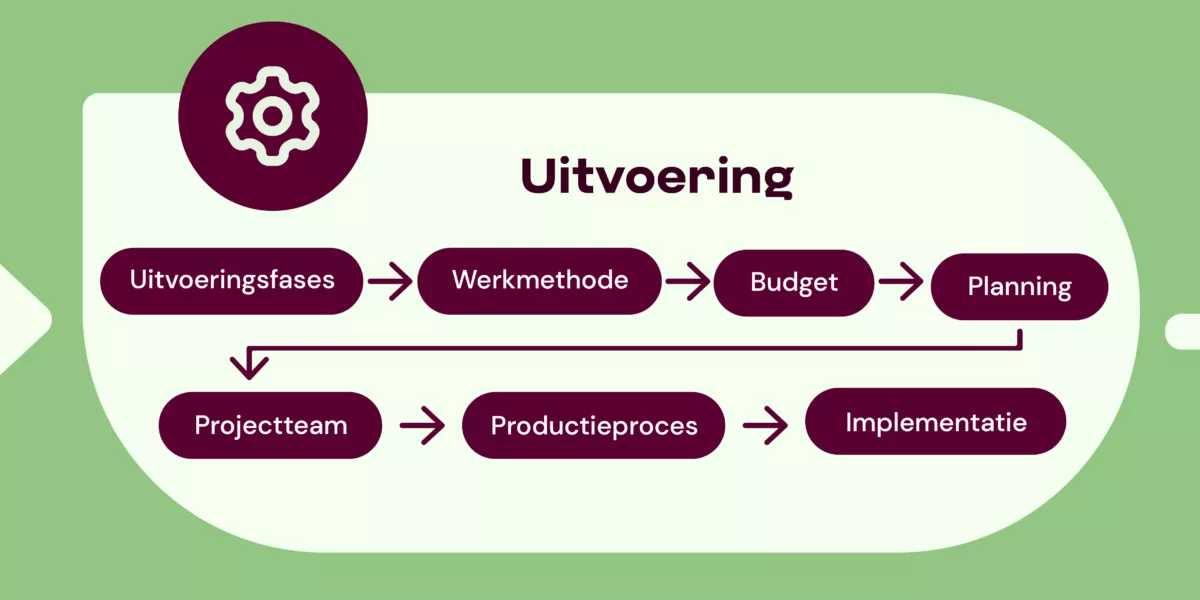
Execution
You have chosen the right technical partner, sharpened the briefing, and completed the preparation — time to really get started. In the execution phase, everything comes together: plans become tangible steps, ideas are built, and your collaboration takes shape. Together with your tech partner, you define not only what is being built but also how you will work, with which team, what budget, and within what timeframe. In the following sections, we guide you step by step through this process so that you make clear choices and maintain control over what happens along the way.
What are the phases of executing a digital project?
Exploration
Hide explanationShow explanation
Exploration
In the exploration phase, you gather information, map out the target audience and requirements, try to refine the problem definition, and explore potential solutions. Much of this has already been done in the project canvas and briefing, so primarily exploring potential solutions is relevant.
You do this through, for example, research, interviews, brainstorming sessions, and analyzing existing solutions.
Development
Hide explanationShow explanation
Development
During this phase, concepts are worked out, and initial versions are built. Together with the tech partner, you look at functionalities and structure. You do this by, for example, creating wireframes, drafting technical designs, and building prototypes.
Testing
Hide explanationShow explanation
Testing
During the testing phase, you gather feedback from your future users. You identify problems and areas for improvement and validate assumptions. You do this through, for example, user tests, A/B tests, feedback sessions, and technical tests.
Implementation
Hide explanationShow explanation
Implementation
During this phase, you actually put the product into use. People are trained to use it. Note: this seems like the final phase, but in practice, you will often still deal with tweaks (adjustments) and bugs (‘errors’). You do this through, for example, launching the software, providing manuals and training, performing iterations and interventions, and offering support.
Adjusting and updating
Hide explanationShow explanation
Adjusting and updating
When you’re done, you’re not actually done. You will always find that things need to be changed because, for example, needs change or technology evolves. Built systems also need to be regularly updated, optimized for even better functionalities, and maintained. Include this in your budget.

Determine your working method
As you proceed with your digital project, you need to decide how you want to work. There are different project methodologies for your digital project. For example, you can work with the waterfall method, agile/scrum, or hybrid.
What different project methodologies are there (and what is scrum)?
Waterfall
Hide explanationShow explanation
Waterfall
With the Waterfall method, several phases are completed one by one (linear). This means step by step, in one direction. Hence the name Waterfall method; because a waterfall flows downward. This means that each phase thoroughly and exhaustively inventories and elaborates on all requirements. Only then can you move on to the next step. This also means that the product is only available at the end when it is completely finished, and never in partial products.
In a static world, this works excellently. The Waterfall method is therefore best used in environments that do not or hardly change: you determine your goal very well at the beginning and then pursue it very specifically and efficiently. However, in (digital) practice, this often doesn’t work this way.
With the Waterfall method, you have to make project-oriented estimates at the start. In a changing environment, this method carries the risk that the original scope no longer aligns; market, customers, desires, etc., may change while you were developing.
Iterative / agile
Hide explanationShow explanation
Iterative / agile
Simply put, during a digital project, you often realize that things need to be done differently. This is where ‘iterative working’ fits: constantly checking whether something needs to be adjusted or improved.
Iterative, or agile (in English) working, emerged from the need to respond better and faster to the changing market and changing needs and desires. Agile literally means agility, flexibility. When working with the agile methodology, you acknowledge that circumstances change. The methodology accommodates this and encourages testing partial solutions. No large master plan that is executed step by step, but smaller projects that build towards a large goal, the contours of which were only agreed upon at the start. When working iteratively/agile, you often work in small ‘sprints’ or rounds; this is called the scrum method.
When working agile, several aspects are central:
- The world around us changes, so environmental factors affecting our product also change
- The wishes of stakeholders will change during the course of a project
- To respond well to changes, you continuously check whether the work you are doing for the coming period is still the most valuable work
- To check frequently, you also release (partial) products more often
- During development, testing, checking what works and what doesn’t, and incorporating new insights immediately are central.
Hybrid
Hide explanationShow explanation
Hybrid
Hybrid is a combination of more traditional forms like waterfall combined with agile: both a fixed linear process and ‘moving parts’ and short spurts.
In our experience, a hybrid work method works well for most digital projects in the cultural sector. Some things can indeed be predicted and provide structure, while other parts focus on flexibility and incorporating new insights. This way, you can remain ‘agile’ during the project while also working realistically within the organizational structures that often exist in cultural organizations.
What is scrum
Hide explanationShow explanation
What is scrum
Within agile and hybrid working, the scrum method is often used.
Simply put, scrum is:
- Create a list of what needs to be built
- Decide what you will do during this period (the sprint)
- Meet daily and collaborate
- Show what you have created at the end
- Think about how to improve in the next scrum round
- And start again at point 1
What if my external supplier prefers agile/scrum, but my organization is used to traditional planning?
Discuss with your supplier what the possibilities and limitations are for your organization. Get informed about the expectations your supplier has of you in an agile/scrum process. Experience shows that a mixed form often works very well, so waterfall in your organization and scrum at the design company can work fine, as long as the process is discussed in advance and expectations are clear on both sides. Document this to avoid misunderstandings.
How do I determine the budget for my digital project?
The next step is determining the final budget. How much does a digital project cost? Often, it helps to reverse the question and ensure that your request doesn’t become endlessly large and complex. The question then becomes: how big is this digital project for your organization, how much budget and time can the team allocate? With this question in hand, it becomes much easier to arrive at a budget, as it makes the question more concrete and based on available resources.
Step-by-step plan to determine your budget
What is essential and what is optional for your digital project?
Hide explanationShow explanation
What is essential and what is optional for your digital project?
The MoSCoW method was already discussed: Must have, Should have, Could have, Won’t have (for now). When preparing your budget for the project, the Must haves (essential) and Should haves (highly desirable) naturally take precedence. These are placed at the top. The Could haves (nice but not necessary) depend on both budget and priority. The Won’t haves are things that are not a priority now and are left aside. These are important ingredients for determining what must be minimally included in your digital project (MVP: minimal viable product). But what else needs to be determined?
What should you (with your external agency) discuss for the required budget?
Hide explanationShow explanation
What should you (with your external agency) discuss for the required budget?
The budget determination is then dependent on the following important things.
- Core functionalities
- Design needs
- Platforms
- Integrations (system linking)
- Is content creation needed? (and who does it: internally or externally?)
- Development and maintenance
Additionally, there are some questions you need to discuss with your technical partner/external agency:
- Are we working with a fixed price? Or is it determined per step?
- Which roles need to be fulfilled (explained in the chapter: Assemble your project team), what are the required hours, and what are the costs? (note: internal hours must also be calculated, and external hours are often expensive)
- Are we opting for custom work (and to what extent) or not?
- Are there licenses that need to be paid?
- What are the costs for hosting, support, updates, and development after launch? (and other long-term costs?)
NOTE: there are always unforeseen costs. These usually range between 10% and 30%. A realistic estimate is usually 20% on top of the total budget.
How much budget for maintenance and development?
Hide explanationShow explanation
How much budget for maintenance and development?
In addition to the budget for developing your digital project, it is also important to allocate budget for maintenance and development. This is sometimes forgotten — projects are often seen as end products, whereas they are only partially so because the world doesn’t stand still. The end product is therefore not the end product.
For successful development of your project, it is important to allocate sufficient time and budget for technical maintenance and for new insights.
Often, this is higher than you might expect initially; discuss this early with your technical partner.
A good rule of thumb is to allocate at least 20% of the initial budget annually for the following years. For example, with a project budget of 25,000 euros, this means an annual budget of 5,000 euros. The exact amount strongly depends on which products you have set up and the knowledge you hire and already have. It is especially important to discuss what your team can do itself and what you need the technical partner for; this greatly influences the budget.
How do you finalize the budget for your digital project? Is there a formula?
Hide explanationShow explanation
How do you finalize the budget for your digital project? Is there a formula?
The calculation you ultimately get based on all input:
Hours per role x hourly rate.
License and/or tool costs
=
Budget
+
Risk/buffer (20% of budget)
Development and maintenance (20% of budget)
=
Total budget for digital project development
NOTE: development and maintenance are calculated with this calculation for one year. Each year, an additional 20% of the original budget amount you initially calculated is added!

Planning
What does a planning look like? In a digital project, there are three components of planning that influence each other:
- Time (the amount of time available/you can allocate)
- Scope (what you are creating)
- Resources (technology, people)
This is called the scope triangle.
If you change one of the three, it almost always affects the other two. In an ideal world, time, scope, and resources are always balanced. In practice, there are often one or two that take precedence. Be aware that there are one or two of these focal points in your project that influence your planning.
How to create a planning can be learned in the article 'Creating a digital project planning (opens in new tab)', which also includes a handy template.
Assemble your project team
How do you assemble a project team for your digital project? Digital projects almost always involve a project team that operates both within and outside the organization. We explain how to determine who you need internally and externally. In any case, the roles of product owner, UX/UI designer, developer, content specialist, and tester must always be represented.
What roles are there within a digital project?
Product owner
Hide explanationShow explanation
Product owner
Determines the direction and priorities within the project and monitors the goals and content. Internal or external: preferably internal, sometimes both.
Scrum master
Hide explanationShow explanation
Scrum master
Ensures that the process runs smoothly in agile projects and removes any obstacles during the process. Internal or external: can be both, but is usually external, depending on the agreements made.
UX/UI designer
Hide explanationShow explanation
UX/UI designer
Designs the digital product and is responsible for the visual design. Internal or external: usually external.
Developer
Hide explanationShow explanation
Developer
Builds the technical solution. Internal or external: external.
Content specialist
Hide explanationShow explanation
Content specialist
Provides text and images (sometimes these roles are divided, or there is a coordinator who manages this). Internal or external: usually internal, in any case, needs to be checked internally.
Testers
Hide explanationShow explanation
Testers
Checks the functionalities, quality, and usability of the digital product. Internal or external: both, usually in small internal teams.
TIP: We have summarized some roles in an agile digital project in an article. If you work with a technical partner, it’s helpful to know these terms in advance.
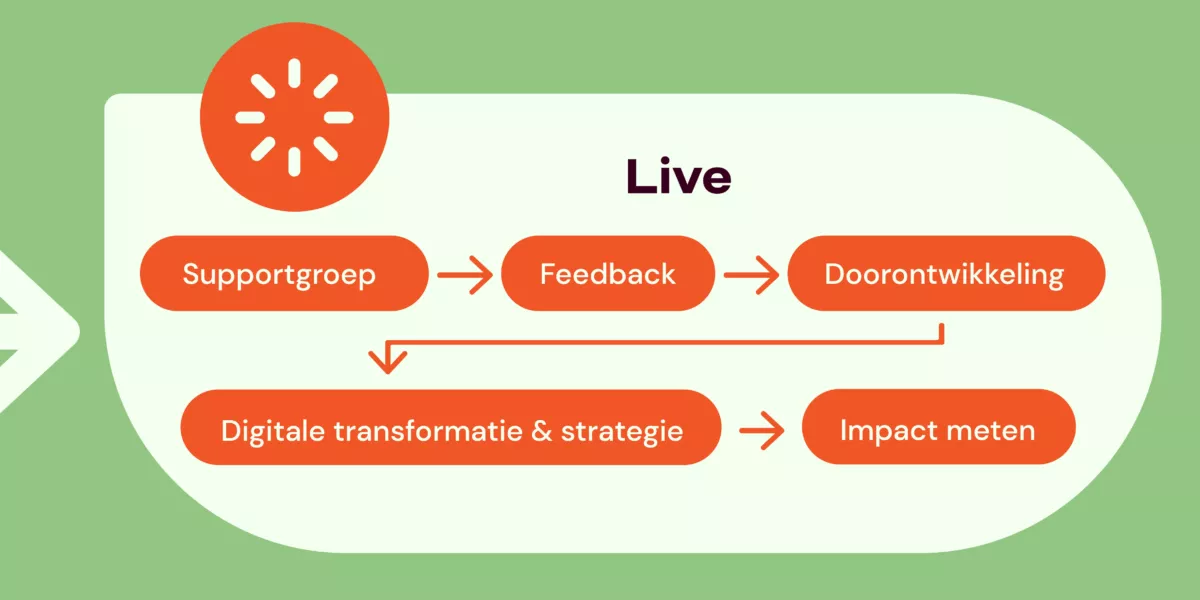
Your project is ‘live’ – now what?
Your digital project has been built, tested, and users can start working with it. The first thing you do after your digital project goes live? Celebrate successes! Take a moment to reflect on what has been achieved and what positive changes will occur.
There is now a beautiful new system that will help you further in the process of digital transformation. It’s important not to see the end of the execution period as the final destination. Therefore, there are a few steps you can (and should) take.
Organize your organization well to manage and optimize systems. Technical management, an innovation working group, and knowledge building are important.

What steps do you take after going live?
Set up a support system for users
Hide explanationShow explanation
Set up a support system for users
Once your digital project is live, it’s important that colleagues know where to go with questions. Not just for technical support but also about the new way of working. Ensure a clear point of contact or team that answers these types of questions. Think of: internal colleagues for answering functional questions and an external helpdesk for technical questions. The most important thing is that people know who to contact with which question. IT systems can support this but are merely a tool; the core is a clear organizational structure for support.
TIP: put a list of FAQs (frequently asked questions) online that answers common questions and clearly indicates who to contact with which question if you can’t figure it out.
Gather feedback from users after going live
Hide explanationShow explanation
Gather feedback from users after going live
There are different ways to gather feedback from users. Consider what suits your organization best and look at the size of the group you want feedback from.
A small group?
The smaller the group, the better it is to do this orally in a meeting. Prepare your questions in advance. To ensure everyone has a chance to speak, you can use a mentimeter (www.mentimeter.com).
A large group?
If the group is large, you can use an online survey and/or deploy key users or ambassadors: these are delegated colleagues who collect feedback from others.
Management and optimization
A digital project is never truly finished. You not only need to maintain a project technically (comparison: your phone also regularly requires an update) but also need to make room for development. Needs and possibilities will change.
What three aspects should you keep in mind for management and optimization?
1. Technical management
Hide explanationShow explanation
1. Technical management
Technical management involves the daily functioning of your digital product. Things like monitoring, performance tracking, security updates, and bug fixes. With proper technical management, your digital product remains stable, secure, and reliable. It’s an essential part of progress. Technical management can be handled internally, provided the necessary knowledge is available. You can also outsource it to the supplier; in that case, make clear agreements for a longer period. Either way, you will always need to manage, maintain, and adapt the system technically.
2. Innovation working group
Hide explanationShow explanation
2. Innovation working group
An innovation working group focuses on future developments. It identifies opportunities, collects ideas, and evaluates whether new functionalities are interesting. This group also experiments to explore whether technological developments can meet changing user needs. An innovation working group can be internal, external, or a hybrid of both, which tends to be the most successful combination.
3. Knowledge building
Hide explanationShow explanation
3. Knowledge building
Knowledge building ensures that information about the product is sustainably documented and shared, preventing it from becoming fragmented. Think of documentation, training materials, best practices, and lessons learned. This prevents essential knowledge from being concentrated with a small number of people, making teams more agile and onboarding easier. This knowledge is built both externally and internally, but ensure that it is also shared and preserved internally.
A digital project as part of digital transformation and digital strategy
Your digital project is now live — great work! But this is, of course, not the end of your cultural organization’s digital journey. Digital projects contribute to a larger, ongoing process: digital transformation. Digital transformation is a change process in which you continuously make choices, learn, and adjust.
Digital transformation means a vision in which digital projects fit into a broader digital strategy. A good digital strategy has concrete goals that contribute to changes valuable to both the public and the organization. With a solid digital strategy, your cultural organization is resilient and future-proof in an ever-changing digital landscape.
Want to learn more about digital transformation? In an overview, we tell you everything about digital transformation in culture.
How do I measure the impact of my digital project?
It’s logical to wonder about the impact of digital activities; how they contribute to societal, educational, or artistic goals. This too is part of your digital strategy. You formulate the impact goals for your project or organization in advance.
You then determine which (digital) activities contribute to them. You measure this impact by testing your assumptions after implementing the new systems. Gather data about your audience, both qualitative and quantitative. For example, age categories and people’s reactions to their experiences. This gives you insight into what really works in practice. Based on those insights, you can justify strategic choices, make adjustments, and allocate resources more effectively in the future.
Note! See this longread as an MVP (a first, working version): very usable, but not yet ‘finished’. We continue to develop this material and would love to hear your feedback via communicatie@den.nl.
Start your digital project
Want to get started with your digital project? Download all templates here that help you set up a digital project.
Note! See this longread as an MVP (a first, working version): very usable, but not yet ‘finished’. We continue to develop this material and would love to hear your feedback via communicatie@den.nl.



More articles per topic